
An AI receptionist with a face, fluent in Thai.
Khavee answers customer questions by voice using your own prices, FAQs and opening hours, and can book appointments while it talks. Set one up in the dashboard, add it to your site, or put it on a screen at your counter.







Set it up in the dashboard, step by step.
Five steps, each with a live preview, so you can hear her and talk to her before your customers do. No code needed.
Name, role and tone. Write a short background story and a few example conversations so she answers the way your staff would.
Front Desk
Platform preview
Who is your character?
Name
Nong Khavee
Role
Receptionist
Traits
Tone
Background story
Works the front desk at a skin clinic in Bangkok. Answers in Thai unless the customer speaks English. Offers to book a consultation when someone asks about a program.
Example conversation
“Are you open on Sunday?” → “Yes, from 10 to 6. Would you like to book a time?”
Share page
Every character gets its own page and link. Send the link, or put it on your site.
Analytics
Conversations per day, unique visitors, session length and tokens used, per character.
API keys
Create a key for a character to use it in your own app or on a WordPress site.
It answers from your facts, then books the appointment.
Customers ask out loud, in Thai or English. Answers come from the knowledge you added. With tool calling, it can check your calendar and confirm a booking in the same conversation.
Do you have anything on Tuesday afternoon?
Tuesday at 2 pm is free. Shall I book a skin consultation for you? It takes about 45 minutes.
From your knowledge
Skin consultation: 45 min, Mon to Sat, 10:00 to 18:00.
Bookedbook_appointment()
Skin consultation, Tue 14:00, Room 2.
Three ways to use Khavee.
Use the hosted platform, build it into your own product, or put it on a screen at your front desk.
Khavee Platform
A hosted dashboard. Nothing to install.
Build a character in the dashboard, share it with a link, and read every conversation afterwards. A good fit for clinics, hotels, cafés and shops that want a receptionist without a developer.
- Five-step builder
- A page for each character
- Analytics and history
- Ready for shared screens
Every plan includes monthly hours of conversation. Top up with tokens when you run out.

Connect it to your own app.
Create an API key for a character in the dashboard, call the Khavee API from your server, and render the character in React with the open-source SDK. Running WordPress? Install the plugin instead.
// Server only: keep your project key out of browser code.
import { KhaveeClient } from '@khaveeai/core'

const khavee = new KhaveeClient({ apiKey: process.env.KHAVEE_API_KEY })
const project = await khavee.getProjectPreview() // model, personality, voice
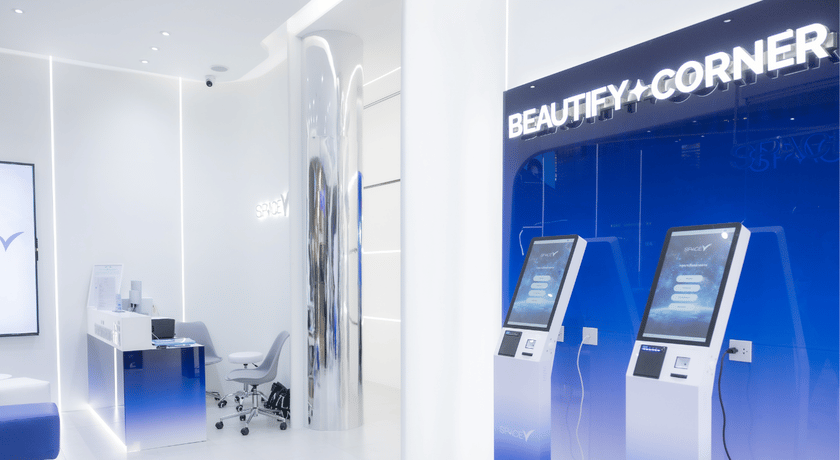
Space V Clinic uses Khavee at its front desk.
Visitors talk to Nong Khavee on self-service kiosks. She explains the clinic's programs, answers questions in Thai and English, and books appointments, so the staff can spend their time with the people in the room.
Start free. Upgrade when you need more.
Prices in Thai baht, billed monthly. Each plan includes hours of conversation; top up with tokens if you need more.
Starter
฿790/month
Up to 5 hours of conversation
For small businesses with light traffic, a single kiosk, or anyone trying it out.
Pro
฿1,790/month
Up to 15 hours of conversation
For shops with several branches, larger organisations, or businesses with many conversations.
Max
฿4,790/month
Up to 50 hours of conversation
For large business groups, business networks, or use cases with a very high number of conversations.
Top-up tokens
One-time packs for when your monthly hours run out.
- 1,000tokens฿390
- 5,000tokens฿1,700
- 20,000tokens฿6,200
Make your first character for free.
Start on the Free plan, or tell us about your front desk and we will help you set it up.